SignSee - Dutch Sign Language Learning Platform
Demo
View Repository
Overview
SignSee is a full-stack Dutch Sign Language, NGT, fingerspelling learning platform built as a year 2 capstone project. The application helps users learn, practice, and contribute new training data for static NGT alphabet signs through a webcam-based recognition system.
The project recognizes 22 static NGT alphabet signs: A, B, C, D, E, F, G, H, I, K, L, M, N, O, P, Q, R, S, T, V, W, and Y. It combines a Vue frontend, FastAPI backend, PyTorch and MediaPipe inference pipeline, PostgreSQL user progress tracking, admin monitoring, Azure ML training workflows, MLflow support, Dockerized deployment, and automated CI/CD.
My Role
My main contribution focused on the MLOps and Azure deployment side of the project. I worked on making the machine learning workflow reproducible, traceable, and deployable instead of leaving the model as only a local prototype.
My work covered versioned Azure ML data assets, repeatable preprocessing and training pipelines, hyperparameter sweeps, conditional model registration, model promotion, Docker-based deployment, and GitHub Actions automation. I also worked on blue/green endpoint deployment and validation: staging a new model, testing it independently, and switching traffic after the checks pass.
The evidence below follows that work from training data to a deployed model. The Azure ML screenshots capture completed runs and deployment states from June 2026.
Problem
Many sign language recognition projects stop at a notebook or demo model. For this project, the goal was broader: build an application where users can actually learn and practice signs, while also supporting future model improvement through data collection, monitoring, and retraining.
That meant the challenge was not only computer vision accuracy. The bigger challenge was building a complete ML product around the model: frontend interaction, backend inference, model serving, user progress, data feedback, monitoring, retraining, and deployment automation.
Key challenge: How can a sign-language recognition model become a usable learning product with the surrounding infrastructure needed for reliable deployment and future improvement?
Product Features
- Welcome, login/register, and guest mode.
- Learning mode with reference images, hints, webcam recognition, and hold validation.
- Random Letters game with scoring, streaks, skips, delayed hints, and final summary.
- Data collection mode using webcam capture, image upload, or model-assisted auto-labeling.
- User statistics such as streaks, points, levels, daily goals, and per-letter progress.
- Admin dashboard for request metrics, latency, errors, confidence, entropy, prediction distribution, and drift-like monitoring signals.
- Real-time WebSocket inference for webcam-based prediction.
The product was designed not only for prediction, but also for learning. Users can see reference signs, practice them, receive feedback, and gradually build progress across the alphabet.
Machine Learning and Computer Vision
The main model uses EfficientNet-B0, fine-tuned for 22 NGT alphabet classes. The inference pipeline uses MediaPipe to detect hands and prepare cropped hand images for classification.
A secondary landmark-based MLP model can support the image classifier in low-confidence cases. The backend also includes temporal smoothing, sticky predictions, hand-slot tracking, and sequence-building logic to reduce prediction flicker during webcam use.
The local model assets included:
best_ngt_model_v2.pthbest_landmark_mlp.pthhand_landmarker.task
The repository contains two raw dataset snapshots: an earlier version with around 1,099 images and a later version with around 6,599 images across 22 class folders. The second dataset version contains almost 300 images per class.
Training Pipeline
The Azure ML training package performs a complete training workflow:
- Stratified train/validation/test split.
- Offline augmentation on the training data only.
- EfficientNet-B0 fine-tuning.
- Evaluation using classification metrics.
- Metric-based quality gates.
- Conditional model registration.
The default training configuration used batch size 16, 30 epochs, patience 7, image size 224, seed 42, an accuracy gate of 0.85, and a macro-F1 gate of 0.80.
This setup helped prevent weak models from being promoted automatically. Instead of replacing a model blindly, the training pipeline checks whether the new model passes predefined quality thresholds first.
Versioned Data and Automated Retraining
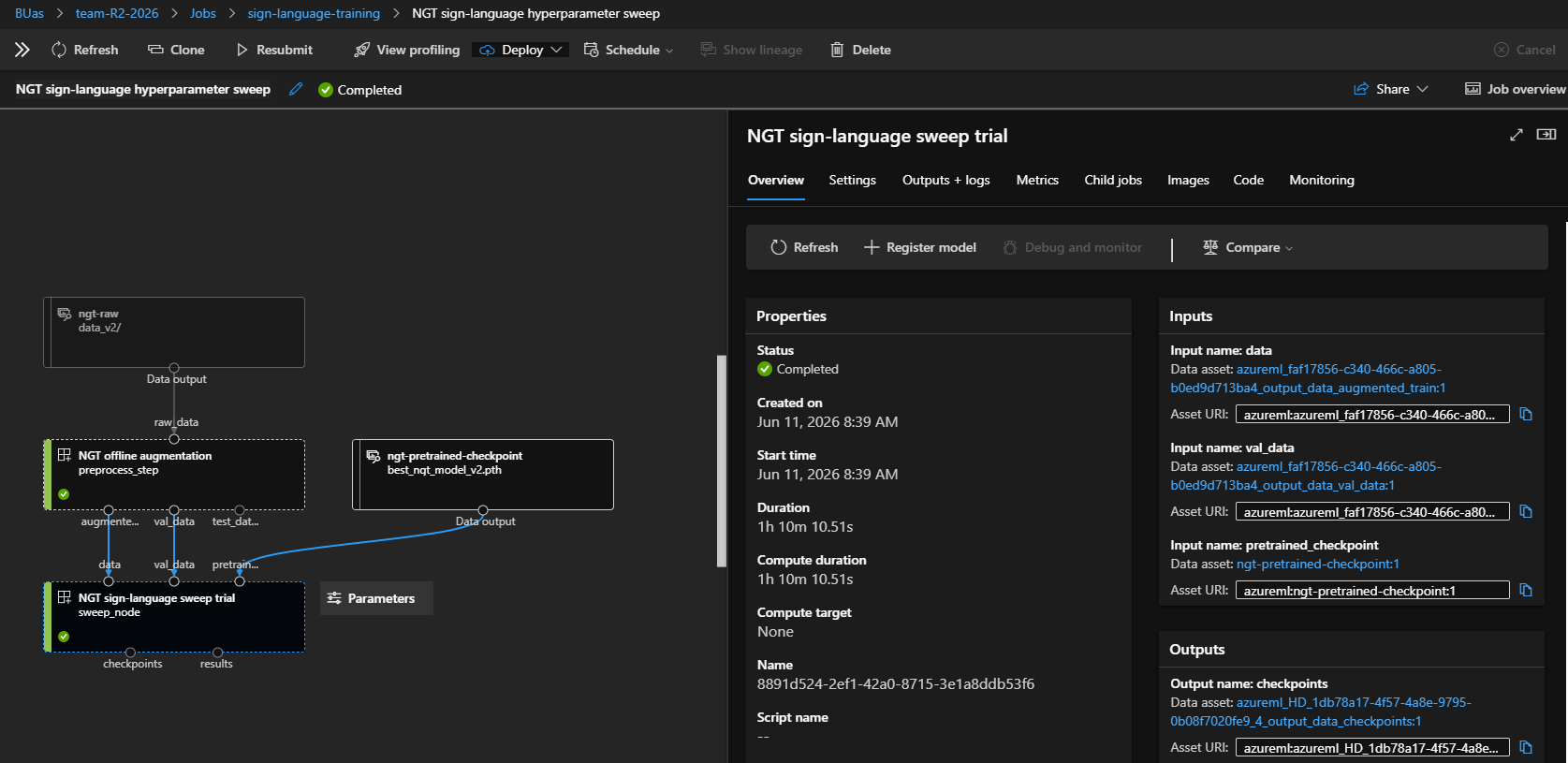
The raw ImageFolder dataset is registered as the Azure ML data asset ngt-raw. Each version carries an image count and a deterministic manifest hash, connecting a training run to a specific dataset snapshot. Preprocessing creates a stratified 80/10/10 train/validation/test split, with augmentation applied only to training images.
A scheduled checker inspects the latest registered dataset and previous retraining jobs. It submits work when enough new images are available, the configured retraining interval has elapsed, or a forced run is requested. It also skips submission while another retraining job is active. This makes the schedule a decision point rather than an instruction to retrain unconditionally.
Hyperparameter Search and Experiment Tracking
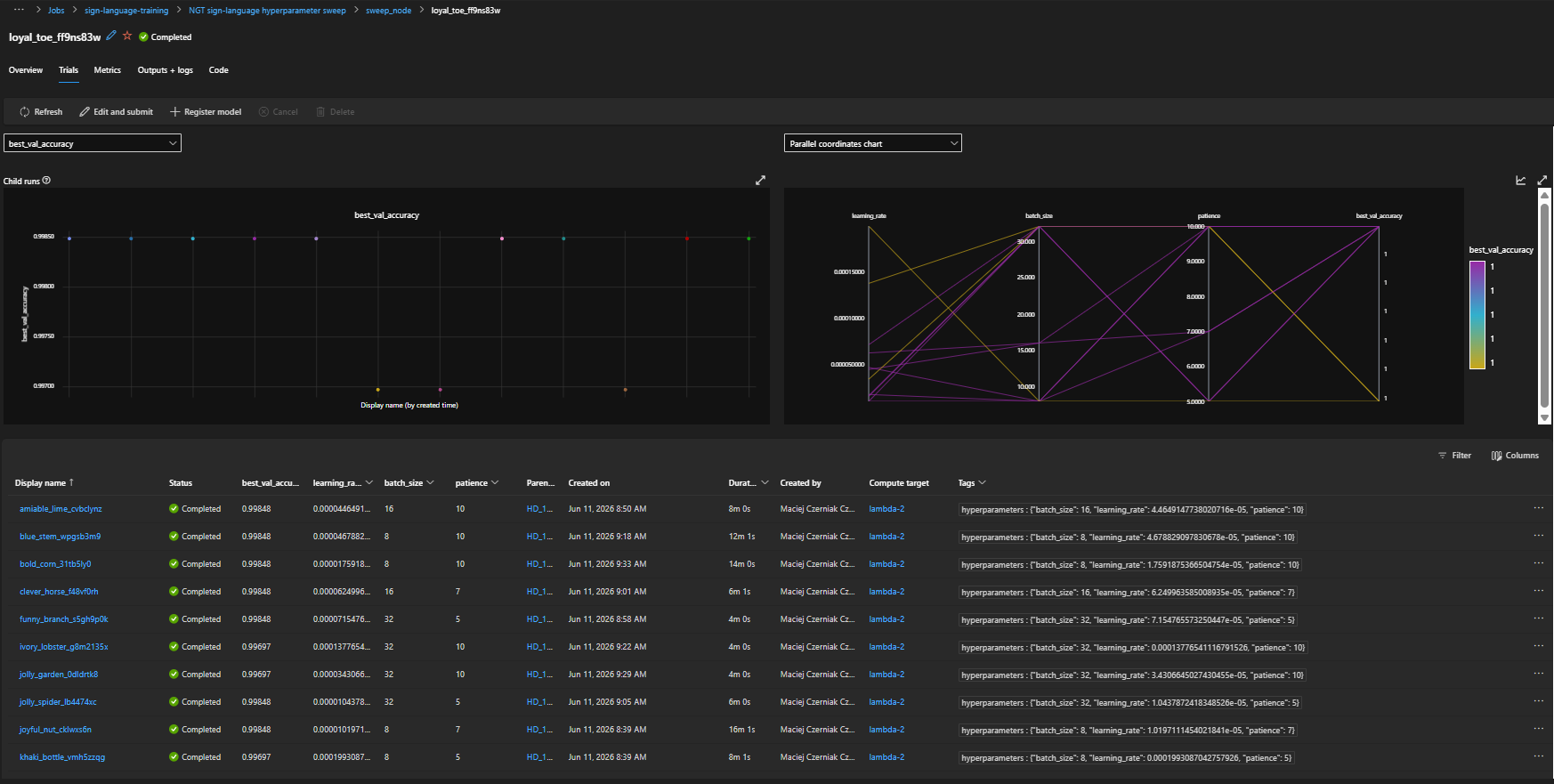
The automated workflow supports both a single training configuration and a hyperparameter sweep. The sweep uses random sampling to explore learning rate, batch size, and early-stopping patience, maximising best validation accuracy. Trial count, concurrency, and timeouts are configurable to control compute use.
Each trial logs per-epoch training and validation loss, accuracy, and learning rate to MLflow. Saved artifacts include learning curves, the best checkpoint, training history, evaluation metrics, a classification report, and class names.
Model Registration and Promotion
Registration and promotion are separate decisions. Accuracy and macro-F1 thresholds control whether a model enters the registry. The current sweep finaliser ranks registered candidates by macro-F1, then accuracy, and promotes a candidate only when it improves on the currently promoted model, or when no promoted model exists.
Backend and API
The backend is built with FastAPI. It exposes routes for health checks, HTTP prediction, WebSocket prediction, data collection, user progress, shared statistics, and admin monitoring.
Authentication is handled with JWT-based FastAPI-Users. Anonymous users can still use prediction and data collection features, while signed-in users get persistent progress tracking. Admin users can access monitoring and operational metrics.
The database stores users, user statistics, collected samples, monitoring events, per-letter progress, and daily activity.
Azure Architecture and Deployment
The Azure deployment configuration separates the web application from model serving. The frontend and endpoint-backed API run in Azure Container Apps, while the model is served through an Azure ML Kubernetes online endpoint on the university’s connected compute infrastructure.
- FrontendVue application in Azure Container Apps
- Endpoint APIFastAPI service forwards prediction requests
- Model servingAzure ML Kubernetes online endpoint
This Azure endpoint-backed service is a separate serving path from the main backend that loads local model files. The repository also supports an on-prem setup with Docker Compose, Portainer, PostgreSQL, MinIO, MLflow, and Airflow retraining.
Blue/Green Deployment Demonstrated
The captured Azure endpoint shows both blue and green deployments successfully provisioned, with 100% of live traffic assigned to green and 0% to blue. This records an actual deployed endpoint state following a traffic switch.
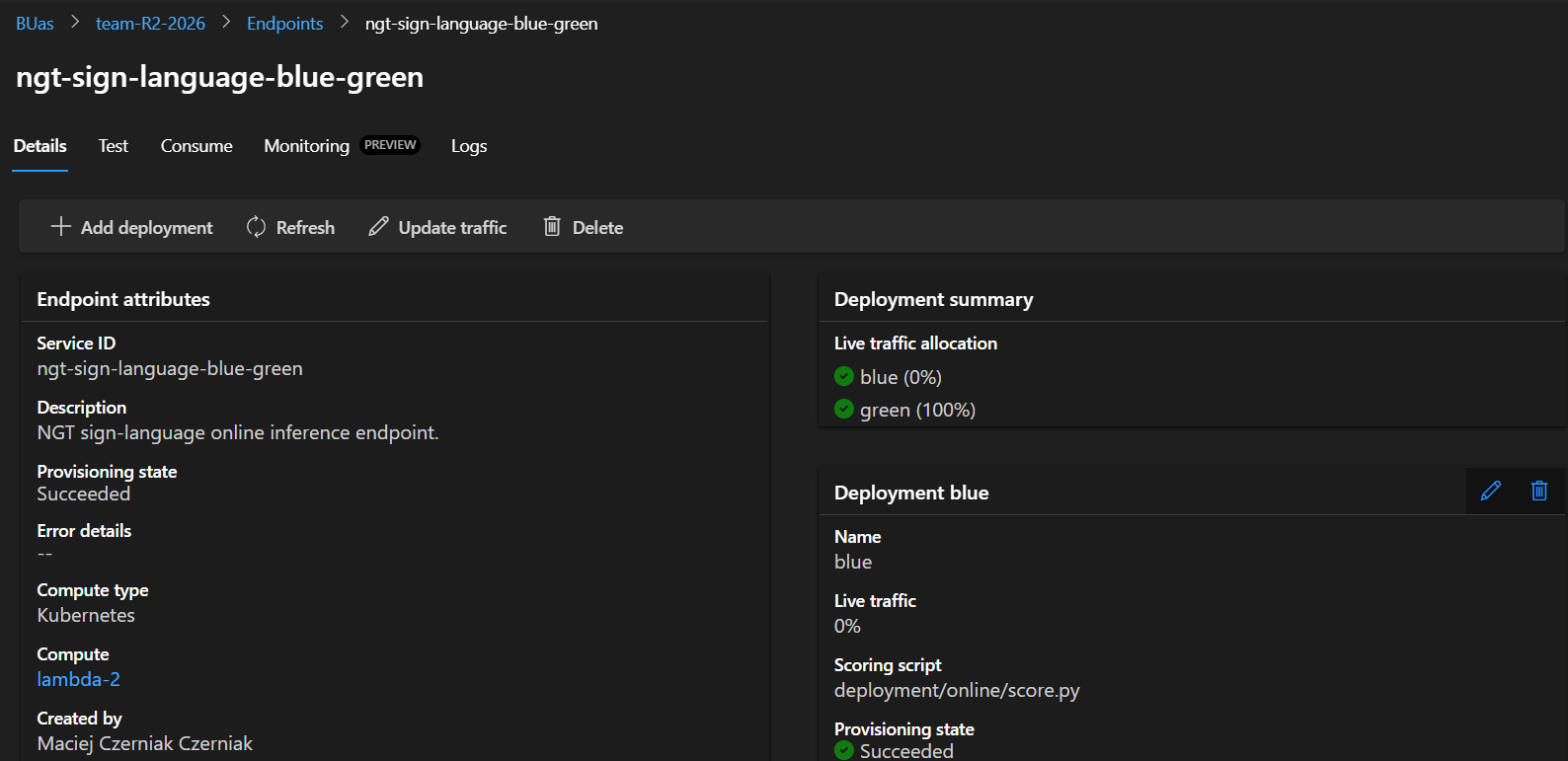
The promoted-model deployment workflow compares the selected model version with the version already serving traffic. If they match, it skips redeployment. When a new version is available, the workflow performs these steps:
- Deploy the promoted model to the inactive colour at zero production traffic.
- Address that deployment directly and run endpoint smoke tests.
- Activate the staged deployment only after those tests pass.
- Switch endpoint traffic to the tested model.
The rollout tooling also supports switching traffic back to the previous colour. A separate canary script offers gradual traffic allocation as an alternative rollout strategy.

CI/CD and Model Lifecycle
Application delivery follows code quality checks → Docker image build and push → Azure deployment. The Azure workflow uses GitHub OIDC authentication and deploys images tagged with the source commit SHA. It also checks backend health and information routes, the frontend HTTP response, and the WebSocket landmark response.
Model updates follow their own lifecycle:
- Version dataRegister a dataset snapshot and its metadata.
- Train and tuneRun preprocessing and training or a sweep.
- Evaluate and registerApply accuracy and macro-F1 gates.
- PromoteCompare the best candidate with the current model.
- Stage and testValidate the inactive deployment directly.
- Switch trafficActivate the tested model version.
These checks connect the dataset, experiment, registry entry, and serving version, making model updates traceable and controlled.
Operational Monitoring
The application’s operations console exposes request volume, error rate, p50 and p95 request latency, error breakdowns, prediction counts, confidence, and uncertainty. Editable thresholds surface operational problems in the dashboard.
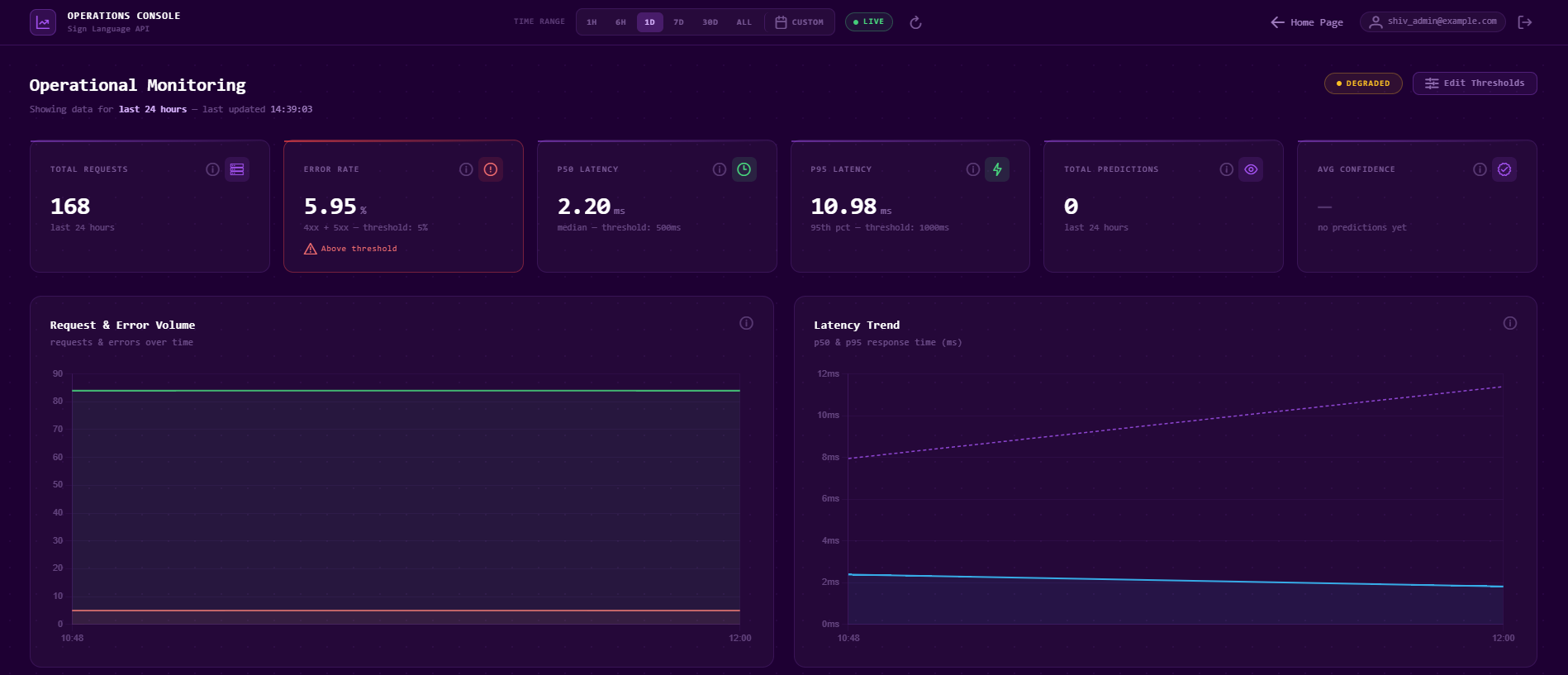
Confidence, uncertainty, and prediction distribution help identify behaviour worth investigating. They do not replace accuracy measured against labelled examples. This distinction matters when deciding whether a model needs new data, evaluation, or retraining.
Implementation References
The implementation is available in my SignSee project repository. Deployment screenshots are preserved on this page.
- Versioned data registration and retraining trigger checks.
- Sweep orchestration and candidate comparison and promotion.
- Promoted-model deployment workflow and blue/green rollout tooling.
- Azure application deployment workflow.
Testing and Quality
The repository includes a broad automated test setup with unit and integration tests. CI checks include formatting, linting, type checking, testing, and coverage validation.
The project uses tools such as:
- Black
- Flake8
- MyPy
- Pytest
- Docker
- GitHub Actions
This helped keep the project maintainable while several parts of the system were being developed in parallel.
User Testing
The project included user testing sessions focused on onboarding, learning, playing, and data collection. Users generally understood the learning and game concept and responded positively to the visual design.
The tests also showed practical challenges. Prediction quality could be affected by hand angle, lighting, and user positioning. Users also needed reference material before playing effectively, which confirmed the importance of hints, example signs, and a clear learning flow before gameplay.
What I Learned
This project made MLOps much more concrete for me. It showed that production machine learning is not just about training a model and deploying it once. A real ML product needs reproducibility, model versioning, traceability, monitoring, automated testing, deployment control, and a safe way to prevent weak models from replacing better ones.
My main takeaway was that the machine learning model is only one part of the system. The surrounding workflow - data, training, evaluation, registration, deployment, monitoring, and retraining - is what makes the model usable in a real application.
Tech Stack
- Frontend: Vue, TypeScript
- Backend: FastAPI, Python
- Machine Learning: PyTorch, EfficientNet-B0, MediaPipe
- Database: PostgreSQL
- MLOps: Azure ML, MLflow, Airflow, Docker, GitHub Actions
- Deployment: Azure Container Apps, Azure ML online endpoints, Docker Compose, Portainer
- Testing: Pytest, MyPy, Black, Flake8